Presenting results to clinicians
When a doctor or nurse opens a finished interview, they need to see quickly what matters: how urgent the case is, why the patient came, and which warning signs the patient confirmed. A full list of every question and answer is hard to read and hides this information.
This page shows how to build a short, clear view for clinicians (for example a nurse view or a summary note in your system) from the Platform API results:
- Which data to fetch
- Recommended layout
- Picking out each block
- Grouping related symptoms
- Symptom duration
- Possible conditions
- Rules for showing results
Grouping related symptoms uses the hierarchy fields of the Symptoms endpoint, available from Platform API 6.23.0.
Which data to fetch
Fetch the results once the interview is finished. The simplest trigger is the survey_finished webhook, which sends you the survey_id. By default, the result endpoints return 409 Conflict until the interview is finished (see Fetching results).
| Call | What it gives you | Used for |
|---|---|---|
GET /surveys/{survey_id}/summary | Patient age and sex, present_symptoms, absent_symptoms, skipped_symptoms ("don't know" answers) and risk_factors. Each item has id, name, choice_id, source and seriousness, and duration when symptom duration is enabled | Reason for contact, red flags, risk factors, problems, absent and unknown |
GET /surveys/{survey_id}/evidence_assessment?condition_details=true&explanations=true | triage.level, triage.serious (alarming findings) and conditions with probability and explain | Urgency, alarming findings, possible conditions |
GET /surveys/{survey_id}/specialist_recommendation | specialist and channel | Recommended next step |
GET /knowledge/symptoms with the IDs of the present symptoms | parent_id, parent_relation and children for each symptom | Grouping related symptoms |
The name field in the summary holds the medical name of each symptom (for example Dyspnea), which is the wording clinicians expect.
Recommended layout
Show the clinician what decides the next step first, and the long tail last. Each block maps to fields from the calls above.
| Order | Block | What the clinician sees | Data |
|---|---|---|---|
| 1 | Urgency | Triage level, alarming findings, recommended specialist and channel | triage.level, triage.serious, specialist, channel |
| 2 | Reason for contact | The symptoms the patient entered at the start | present_symptoms with source: "initial" |
| 3 | Red flags | Warning signs the patient confirmed, both symptoms and risk factors | present_symptoms and risk_factors with source: "red_flags" |
| 4 | Risk factors | Confirmed risk factors first, then the ones the patient said do not apply | risk_factors not already shown as red flags, split by choice_id |
| 5 | Problems | One card per complaint, with its duration and details | present_symptoms, grouped by parent (see below), with duration (see below) |
| 6 | Other present symptoms | Short tags, not a long list | The remaining present_symptoms |
| 7 | Absent and unknown | What the patient denied, and what they answered "don't know" | absent_symptoms, skipped_symptoms |
| 8 | Possible conditions | Folded by default, with percentages and "Why?" | conditions (see below) |
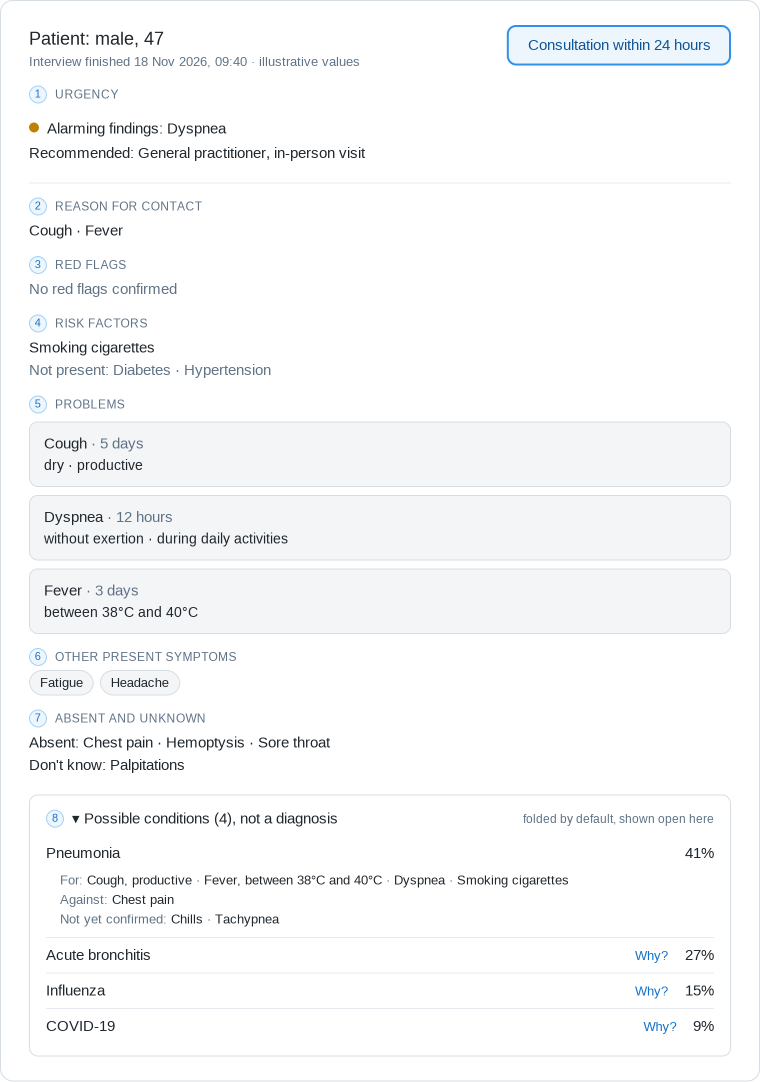
Example clinician view built from Platform API results. The numbers match the blocks in the table above. Values are illustrative.
Picking out each block
The summary already splits answers into present, absent, unknown and risk factors, so most blocks need only one filter:
- Reason for contact: present symptoms with
sourceequal to"initial". - Red flags: items with
sourceequal to"red_flags"in bothpresent_symptomsandrisk_factors. The red flags question can list both symptoms and risk factors, so check both lists. Only the red flags the patient confirmed appear in the summary. - Risk factors: filter
risk_factorsonchoice_id, leaving out the ones already shown as red flags. Showpresentfirst, thenabsent. Showunknowntogether with the other "don't know" answers. - Alarming findings:
triage.seriousfrom the evidence assessment. These are the serious findings behind the triage level, taken from the whole interview, not only the answers to the red flags question. Show them in the urgency block and keep them apart from the red flags block.
// Called from your survey_finished webhook handler.
// api.get is your HTTP client with the Bearer token already set.
const summary = await api.get(`/surveys/${surveyId}/summary`)
const assessment = await api.get(
  `/surveys/${surveyId}/evidence_assessment?condition_details=true&explanations=true`
)
const recommendation = await api.get(`/surveys/${surveyId}/specialist_recommendation`)

const present = summary.present_symptoms ?? []
const riskFactors = summary.risk_factors ?? []
const reasonForContact = present.filter((e) => e.source === 'initial')

// Red flags can be symptoms or risk factors
const isRedFlag = (e) => e.source === 'red_flags'
const redFlags = [
  ...present.filter(isRedFlag),
  ...riskFactors.filter((e) => isRedFlag(e) && e.choice_id === 'present'),
]

// Risk factors shown as red flags are not repeated in the risk factors block
const otherRiskFactors = riskFactors.filter((e) => !isRedFlag(e))
const riskFactorsYes = otherRiskFactors.filter((e) => e.choice_id === 'present')
const riskFactorsNo = otherRiskFactors.filter((e) => e.choice_id === 'absent')

const absent = summary.absent_symptoms ?? []
const unknown = [
  ...(summary.skipped_symptoms ?? []),
  ...riskFactors.filter((e) => e.choice_id === 'unknown'),
]

const urgency = {
  level: assessment.triage.level,
  alarming: assessment.triage.serious,
  specialist: recommendation.specialist,
  channel: recommendation.channel,
}

// Red flags have their own block; everything else feeds the problem cards
const redFlagIds = new Set(redFlags.map((e) => e.id))
const forProblems = present.filter((e) => !redFlagIds.has(e.id))
The symptoms in Reason for contact also feed the problem cards on purpose: Cough entered at the start is the parent that Cough, dry and Cough, productive are grouped under.
Grouping related symptoms
During the interview, the patient is asked about the details of each complaint. Every detail is a separate symptom in the summary, so a flat list repeats the same complaint many times. In the knowledge base, each detail is linked to its parent symptom through parent_id. Use that link to build one card per complaint.
In this real test interview, the summary lists these as separate items:
Separate items in present_symptoms | One card in the clinician view |
|---|---|
| Cough · Cough, dry · Cough, productive · Cough, lasting less than 3 weeks | Cough: dry, productive, lasting less than 3 weeks |
| Dyspnea · Dyspnea, lasting 1 to 24 hours · Dyspnea, without exertion · Dyspnea, during daily activities | Dyspnea: lasting 1 to 24 hours, without exertion, during daily activities |
| Fever · Fever, between 38°C and 40°C · Fever, lasting less than 3 days | Fever: between 38°C and 40°C, lasting less than 3 days |
How to group
- Take the IDs of the present symptoms that feed the problem cards.
- Call
GET /api/mgp/v1/knowledge/symptomswith those IDs (repeat theidparameter), the patient'ssexand age, and the interviewlanguage. Send at most 50 IDs per request (limit=50). - For each symptom, follow
parent_idupwards as long as the parent is also in the summary. The highest symptom you reach is the card the item belongs to. - A symptom whose parent is not in the summary, or which has no parent, is shown as a top-level item.
curl -G "https://api.infermedica.com/api/mgp/v1/knowledge/symptoms" \
  -H "Authorization: Bearer <ACCESS_TOKEN>" \
  --data-urlencode "sex=male" \
  --data-urlencode "language=en" \
  --data-urlencode "age.value=47" \
  --data-urlencode "age.unit=year" \
  --data-urlencode "limit=50" \
  --data-urlencode "id=s_962" \
  --data-urlencode "id=s_1779"
The response holds one item per ID with parent_id, parent_relation and children (see Symptom hierarchy). Here s_1779 has parent_id: "s_962" (Dysphagia) with parent_relation: "location", so both go on one card under Dysphagia.
type Item = { id: string; name: string; choice_id?: string; source?: string }
type Hierarchy = { id: string; parent_id: string | null; parent_relation: string | null }

// Step 2: fetch the hierarchy, 50 IDs per request
async function fetchHierarchy(ids: string[], patient, language: string) {
  const hierarchy = new Map<string, Hierarchy>()
  for (let i = 0; i < ids.length; i += 50) {
    const params = new URLSearchParams({
      sex: patient.sex,
      language,
      'age.value': String(patient.age.value),
      'age.unit': patient.age.unit,
      limit: '50',
    })
    ids.slice(i, i + 50).forEach((id) => params.append('id', id))
    const page = await api.get(`/knowledge/symptoms?${params}`)
    page.items.forEach((item: Hierarchy) => hierarchy.set(item.id, item))
  }
  return hierarchy
}

// Steps 3 and 4: one card per complaint
function groupByParent(items: Item[], hierarchy: Map<string, Hierarchy>) {
  // Show each symptom once (a follow-up summary can list the same symptom more than once)
  const unique = [...new Map(items.map((e) => [e.id, e])).values()]
  const byId = new Map(unique.map((e) => [e.id, e]))

  // Follow parent_id upwards while the parent is also in the summary
  const topOf = (id: string) => {
    let current = id
    const visited = new Set([current])
    let parent = hierarchy.get(current)?.parent_id
    while (parent && byId.has(parent) && !visited.has(parent)) {
      visited.add(parent)
      current = parent
      parent = hierarchy.get(current)?.parent_id
    }
    return current
  }

  const cards = new Map<string, { parent: Item; details: Item[] }>()
  for (const e of unique) {
    const top = topOf(e.id)
    const card = cards.get(top) ?? { parent: byId.get(top)!, details: [] }
    if (e.id !== top) card.details.push(e)
    cards.set(top, card)
  }

  // Cards with details go to "Problems", single symptoms to "Other present symptoms"
  const problems = [...cards.values()].filter((c) => c.details.length > 0)
  const other = [...cards.values()].filter((c) => c.details.length === 0).map((c) => c.parent)
  return { problems, other }
}

const hierarchy = await fetchHierarchy(forProblems.map((e) => e.id), summary.patient, 'en')
const { problems, other } = groupByParent(forProblems, hierarchy)
Things to keep in mind
- Keep the names exactly as received. Grouping only changes where items sit, not what they say. Which detail goes on which card comes from
parent_idalone, never from the text of the name. Do not rename, reword or translate the names. - Optional: hide the repeated parent name. To keep cards short, you may show a detail without the parent name at its start (show Cough, dry as dry under Cough). This is only a display shortcut:
parent_idtells you that the detail belongs under its parent, but the API does not return a separate short label for the detail. Use it only when the detail name starts with exactly the parent name followed by a comma, and show the full name in every other case. Not every detail name starts with its parent's name, and the pattern can differ between languages. - Use
parent_relationto order details if you want the same order on every card, for example location, character, severity, radiation, exacerbating and diminishing factors, then duration. - Not every related item has a parent link. Such items stay as separate entries. Nothing is lost, they are just not grouped.
- Do not group by the text of the name. Splitting names on the first comma works for many details, but not for all of them, and the pattern may differ between languages.
parent_idis the reliable link. - Risk factors have no hierarchy. Items with a
p_ID always returnparent_id: null.
Symptom duration
How long a complaint has lasted often decides what the clinician does next, so show it on the problem card.
If symptom duration is enabled for your account (the SYMPTOM_DURATION setting), the interview also asks how long the patient has had a symptom. The answer is stored on that symptom in the summary as a duration object with a value and a unit (week, day, hour or minute), for example { "value": 5, "unit": "day" }.
When the setting is off, duration is empty. Duration then appears only as part of a symptom name, for example Cough, lasting less than 3 weeks, and it goes onto the card like any other detail (see Grouping related symptoms).
- Show the duration next to the symptom it belongs to. When that symptom is the top of a card, put the duration in the card title, for example Cough · 5 days.
- Show the value and unit as received. You may translate the unit word into the clinician's language. Do not round or convert the value (36 hours stays 36 hours), and do not turn it into a start date.
- Show when the interview was finished. The duration counts back from the moment the patient answered, and a clinician may open the case hours or days later. Show the time you received the
survey_finishedwebhook at the top of the view, so the clinician knows the reference point.
type Duration = { value: number; unit: 'week' | 'day' | 'hour' | 'minute' }

// duration is empty unless symptom duration is enabled for your account
const durationLabel = (d?: Duration | null) =>
  d ? `${d.value} ${d.unit}${d.value === 1 ? '' : 's'}` : null

// Card title, for example "Cough · 5 days"
const cardTitle = (card: { parent: Item & { duration?: Duration | null } }) =>
  [card.parent.name, durationLabel(card.parent.duration)].filter(Boolean).join(' · ')
Possible conditions
The evidence assessment already gives what clinicians usually ask for: a probability for each condition and the reasons behind it.
- Show probability as a whole-number percentage (
0.61shown as "61%"), not as a strength label. Theratinglabels such as "strong" are written for patients; a clinician reads "moderate evidence" very differently from "15%". - Keep the order the API returns, highest probability first.
- Add a "Why?" for each condition from
explain(filled only when you call withexplanations=true):supporting_evidence(for),conflicting_evidence(against) andunconfirmed_evidence(not yet confirmed). The last group tells the clinician which questions would confirm or rule out the condition. See Explain for details. - Fold the list by default and label it "Possible conditions, not a diagnosis". Urgency and the complaints come first.
- Show the full list as received. Do not hide low percentages behind a threshold. Show several conditions or none, never a single one.
const conditions = assessment.conditions.map((c) => ({
  name: c.name,
  percent: `${Math.round(c.probability * 100)}%`,
  why: {
    for: c.explain?.supporting_evidence?.map((e) => e.name) ?? [],
    against: c.explain?.conflicting_evidence?.map((e) => e.name) ?? [],
    notConfirmed: c.explain?.unconfirmed_evidence?.map((e) => e.name) ?? [],
  },
}))
Percentages do not add up to 100%. Each one is the likelihood of that condition on its own, and several conditions can be likely at the same time.
Rules for showing results
The clinician view is your own screen built on data from the Platform API. To keep the results valid under the MDR certification:
- Allowed: re-ordering, grouping, folding and styling of the results.
- Not allowed: rewording names, triage levels or percentages, removing items, or lowering the urgency.
- Conditions: show several or none, never a single one.
- Your own content: keep your own questions and notes visibly separate from the Infermedica results.
Every Platform API implementation must also meet the MDR compliance requirements. If you are not sure whether a change to the presentation is allowed, contact our team before you go live.